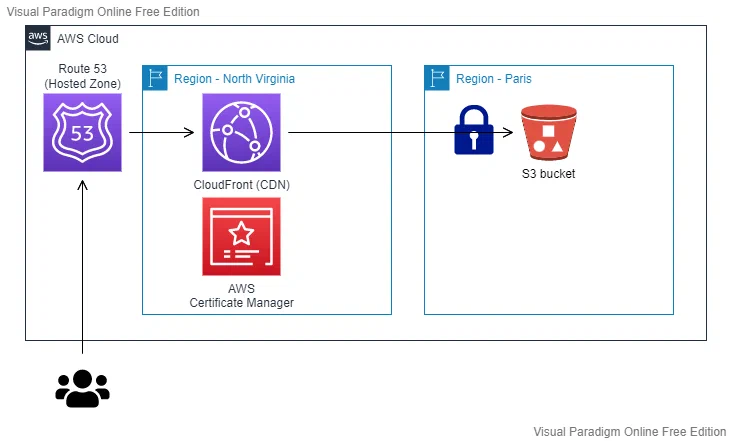
 We have:
- **Amazon Route 53**: Hosting our Hosted Zone and domain (`mehdilaruelle.com`)
- **Amazon CloudFront**: Serving as a CDN (Content Delivery Network) and the entry point for our end users.
- **AWS Certificate Manager**: Hosting our certificate and used by Amazon CloudFront for `HTTPS`
- **An S3 bucket**: Hosting our static website deployed by Hugo and only accessible via Amazon CloudFront. Our bucket is therefore `private`
The entire infrastructure is [deployed using Terraform](https://github.com/mehdilaruelle/terraform-aws-hugo-website).
## Replacing OAI with OAC
In the architecture we've seen, the S3 bucket is private and can only be accessed through Amazon CloudFront.
Previously, the method used was [Origin Access Identity (OAI)](https://docs.aws.amazon.com/AmazonCloudFront/latest/DeveloperGuide/private-content-restricting-access-to-s3.html#private-content-restricting-access-to-s3-oai) which is now deprecated. As a replacement,
AWS has introduced [Origin Access Control (OAC)](https://docs.aws.amazon.com/AmazonCloudFront/latest/DeveloperGuide/private-content-restricting-access-to-s3.html#create-oac-overview-s3).
Unlike OAI, which was seen as a principal IAM CloudFront, OAC is treated as an AWS CloudFront resource.
The advantages of OAC over OAI include support for:
- All S3 buckets in all regions.
- Server-side encryption with AWS KMS (SSE-KMS).
- Dynamic requests (PUT and DELETE) to Amazon S3.
The migration is relatively simple and involves the following steps:
1. [Create an OAC](https://registry.terraform.io/providers/hashicorp/aws/latest/docs/resources/cloudfront_origin_access_control)
2. [Set the bucket policy](https://docs.aws.amazon.com/AmazonCloudFront/latest/DeveloperGuide/private-content-restricting-access-to-s3.html#migrate-from-oai-to-oac)
3. Update Amazon CloudFront by replacing OAI with OAC
You can find the [GitHub commit related to this migration](https://github.com/mehdilaruelle/terraform-aws-hugo-website/commit/163ce5812f9c338da4c9fcd8eb8f5ebc5e24e8dd) or refer to the [official AWS documentation on the subject](https://docs.aws.amazon.com/AmazonCloudFront/latest/DeveloperGuide/private-content-restricting-access-to-s3.html#migrate-from-oai-to-oac) for more details.
## Upgrading to Terraform AWS Provider Version 5
It's not every day that the Terraform `AWS` provider receives a major update, so it's only natural to consider the upgrade. For those who are curious and want to learn more about the new features of the provider, I invite you to [check out HashiCorp's Upgrade Guide.](https://registry.terraform.io/providers/BigEyeLabs/aws-test/latest/docs/guides/version-5-upgrade#provider-version-configuration)
There is no impact on the Terraform code, but I prefer to explicitly mention it in the Terraform code for clarity:
```hcl
terraform {
required_providers {
aws = {
source = "hashicorp/aws"
version = "~>5.0"
}
}
}
```
For those who are not familiar with it, you can use [tfupdate](https://github.com/minamijoyo/tfupdate)
in conjunction with [pre-commit-terraform](https://github.com/antonbabenko/pre-commit-terraform#tfupdate) to help keep your Terraform dependencies up to date.
## Github action & AWS dynamic credentials
Until recently, I used to deploy my blog posts and update themes locally from my terminal because my blog post deployment frequency was relatively low. However, I encountered two main issues:
1. With each deployment, I could face problems related to cached remnants or other anomalies associated with my local environment.
2. I was using static AWS credentials that were used at best once every three months. This was less than ideal for static credentials.
To address these issues, I implemented the following solutions:
1. I set up GitHub Actions (free for up to 2000 minutes per month) to automate the deployment of my site with each `git push`.
2. I implemented temporary AWS credentials for each deployment in GitHub Actions. This approach improves security and reduces the reliance on static credentials.
### Setting up GitHub Action
My goal is: "For every `push` on my `master` branch, I want my `Hugo` site to be deployed to `S3`".
The good news is that on [GitHub Action](https://docs.github.com/en/actions), this can be done easily and for free, as there are pre-built [Actions](https://docs.github.com/en/actions/learn-github-actions/finding-and-customizing-actions) available.
Initially, I used the [Action Hugo](https://github.com/peaceiris/actions-hugo) created by [peaceiris](https://github.com/peaceiris)
for using Hugo in GitHub Actions.
Here is the content of my GitHub Actions workflow file `.github/workflows/main.yml`:
```yaml
name: Hugo deploy website on S3
on:
push:
branches: [ main ] # Only when a push is done on main branch
permissions:
contents: read # This is required for actions/checkout
jobs:
Build_and_Deploy:
runs-on: ubuntu-latest
steps:
# Checks-out your repository under $GITHUB_WORKSPACE, so your job can access it
- name: Git clone the repository
uses: actions/checkout@v4
with:
submodules: 'true' # Some Hugo theme are imported as a submodule, so you need it
# Sets up Hugo with latest version
- name: Setup Hugo
uses: peaceiris/actions-hugo@v2
with:
hugo-version: 'latest'
extended: true
- name: Build
run: hugo --minify
- name: Deploy to S3
run: hugo deploy --force
```
If we summarize the steps of our job, we have:
1. **Checkout**: This step allows us to clone our repository with the necessary submodules for the Hugo themes.
2. **Setup Hugo**: We install **Hugo** in the [extended edition](https://gohugo.io/installation/linux/#editions)
because some of my themes use features from this edition.
3. **Build**: We build our static website, applying [minification](https://en.wikipedia.org/wiki/Minification_(programming)).
4. **Deploy**: Finally, we deploy our Hugo website to S3.
To ensure that Hugo knows how to deploy, at step 4, you'll need to add the appropriate configuration to your `config.toml` file.
In my case, the configuration snippet looks like this:
```toml
[deployment]
[[deployment.targets]]
name = "aws"
URL = "s3://hugo-website-mlaruelle?region=eu-west-3"
```
We have:
- **Amazon Route 53**: Hosting our Hosted Zone and domain (`mehdilaruelle.com`)
- **Amazon CloudFront**: Serving as a CDN (Content Delivery Network) and the entry point for our end users.
- **AWS Certificate Manager**: Hosting our certificate and used by Amazon CloudFront for `HTTPS`
- **An S3 bucket**: Hosting our static website deployed by Hugo and only accessible via Amazon CloudFront. Our bucket is therefore `private`
The entire infrastructure is [deployed using Terraform](https://github.com/mehdilaruelle/terraform-aws-hugo-website).
## Replacing OAI with OAC
In the architecture we've seen, the S3 bucket is private and can only be accessed through Amazon CloudFront.
Previously, the method used was [Origin Access Identity (OAI)](https://docs.aws.amazon.com/AmazonCloudFront/latest/DeveloperGuide/private-content-restricting-access-to-s3.html#private-content-restricting-access-to-s3-oai) which is now deprecated. As a replacement,
AWS has introduced [Origin Access Control (OAC)](https://docs.aws.amazon.com/AmazonCloudFront/latest/DeveloperGuide/private-content-restricting-access-to-s3.html#create-oac-overview-s3).
Unlike OAI, which was seen as a principal IAM CloudFront, OAC is treated as an AWS CloudFront resource.
The advantages of OAC over OAI include support for:
- All S3 buckets in all regions.
- Server-side encryption with AWS KMS (SSE-KMS).
- Dynamic requests (PUT and DELETE) to Amazon S3.
The migration is relatively simple and involves the following steps:
1. [Create an OAC](https://registry.terraform.io/providers/hashicorp/aws/latest/docs/resources/cloudfront_origin_access_control)
2. [Set the bucket policy](https://docs.aws.amazon.com/AmazonCloudFront/latest/DeveloperGuide/private-content-restricting-access-to-s3.html#migrate-from-oai-to-oac)
3. Update Amazon CloudFront by replacing OAI with OAC
You can find the [GitHub commit related to this migration](https://github.com/mehdilaruelle/terraform-aws-hugo-website/commit/163ce5812f9c338da4c9fcd8eb8f5ebc5e24e8dd) or refer to the [official AWS documentation on the subject](https://docs.aws.amazon.com/AmazonCloudFront/latest/DeveloperGuide/private-content-restricting-access-to-s3.html#migrate-from-oai-to-oac) for more details.
## Upgrading to Terraform AWS Provider Version 5
It's not every day that the Terraform `AWS` provider receives a major update, so it's only natural to consider the upgrade. For those who are curious and want to learn more about the new features of the provider, I invite you to [check out HashiCorp's Upgrade Guide.](https://registry.terraform.io/providers/BigEyeLabs/aws-test/latest/docs/guides/version-5-upgrade#provider-version-configuration)
There is no impact on the Terraform code, but I prefer to explicitly mention it in the Terraform code for clarity:
```hcl
terraform {
required_providers {
aws = {
source = "hashicorp/aws"
version = "~>5.0"
}
}
}
```
For those who are not familiar with it, you can use [tfupdate](https://github.com/minamijoyo/tfupdate)
in conjunction with [pre-commit-terraform](https://github.com/antonbabenko/pre-commit-terraform#tfupdate) to help keep your Terraform dependencies up to date.
## Github action & AWS dynamic credentials
Until recently, I used to deploy my blog posts and update themes locally from my terminal because my blog post deployment frequency was relatively low. However, I encountered two main issues:
1. With each deployment, I could face problems related to cached remnants or other anomalies associated with my local environment.
2. I was using static AWS credentials that were used at best once every three months. This was less than ideal for static credentials.
To address these issues, I implemented the following solutions:
1. I set up GitHub Actions (free for up to 2000 minutes per month) to automate the deployment of my site with each `git push`.
2. I implemented temporary AWS credentials for each deployment in GitHub Actions. This approach improves security and reduces the reliance on static credentials.
### Setting up GitHub Action
My goal is: "For every `push` on my `master` branch, I want my `Hugo` site to be deployed to `S3`".
The good news is that on [GitHub Action](https://docs.github.com/en/actions), this can be done easily and for free, as there are pre-built [Actions](https://docs.github.com/en/actions/learn-github-actions/finding-and-customizing-actions) available.
Initially, I used the [Action Hugo](https://github.com/peaceiris/actions-hugo) created by [peaceiris](https://github.com/peaceiris)
for using Hugo in GitHub Actions.
Here is the content of my GitHub Actions workflow file `.github/workflows/main.yml`:
```yaml
name: Hugo deploy website on S3
on:
push:
branches: [ main ] # Only when a push is done on main branch
permissions:
contents: read # This is required for actions/checkout
jobs:
Build_and_Deploy:
runs-on: ubuntu-latest
steps:
# Checks-out your repository under $GITHUB_WORKSPACE, so your job can access it
- name: Git clone the repository
uses: actions/checkout@v4
with:
submodules: 'true' # Some Hugo theme are imported as a submodule, so you need it
# Sets up Hugo with latest version
- name: Setup Hugo
uses: peaceiris/actions-hugo@v2
with:
hugo-version: 'latest'
extended: true
- name: Build
run: hugo --minify
- name: Deploy to S3
run: hugo deploy --force
```
If we summarize the steps of our job, we have:
1. **Checkout**: This step allows us to clone our repository with the necessary submodules for the Hugo themes.
2. **Setup Hugo**: We install **Hugo** in the [extended edition](https://gohugo.io/installation/linux/#editions)
because some of my themes use features from this edition.
3. **Build**: We build our static website, applying [minification](https://en.wikipedia.org/wiki/Minification_(programming)).
4. **Deploy**: Finally, we deploy our Hugo website to S3.
To ensure that Hugo knows how to deploy, at step 4, you'll need to add the appropriate configuration to your `config.toml` file.
In my case, the configuration snippet looks like this:
```toml
[deployment]
[[deployment.targets]]
name = "aws"
URL = "s3://hugo-website-mlaruelle?region=eu-west-3"
```
Note
The URL should include the region. In my case, the region is eu-west-3 (Paris).
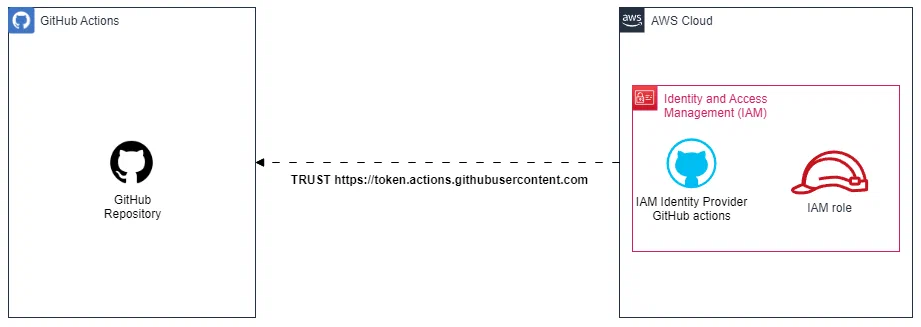 To accomplish this, I've set up [Terraform to establish the Web Identity, which I invite the curious to explore](https://github.com/mehdilaruelle/terraform-aws-hugo-website/blob/master/github-action.tf).
In the [Terraform repository](https://github.com/mehdilaruelle/terraform-aws-hugo-website/tree/master), to enable the deployment
of the Web Identity for your GitHub repository, you need to provide values for the `github_org` (GitHub organization name)
and `github_repositories` (a list of GitHub repositories authorized to assume the Web Identity role). In my case, it looks like this:
```hcl
github_org = "mehdilaruelle" # GitHub Organization name
github_repositories = ["blog_hugo"] # The list of GitHub repositories to allow to assume the Web Identity role
```
Then, run `terraform apply` and retrieve the output of `aws_role_arn` using `terraform output aws_role_arn`.
Keep this output; we will need it for the GitHub Action configuration.
#### Step 2: Setting up the GitHub Action configure-aws-credentials-for-github-actions
Finally, in step 2, we want GitHub Action to be able to assume our role.
In a simplified version, it looks like this:
To accomplish this, I've set up [Terraform to establish the Web Identity, which I invite the curious to explore](https://github.com/mehdilaruelle/terraform-aws-hugo-website/blob/master/github-action.tf).
In the [Terraform repository](https://github.com/mehdilaruelle/terraform-aws-hugo-website/tree/master), to enable the deployment
of the Web Identity for your GitHub repository, you need to provide values for the `github_org` (GitHub organization name)
and `github_repositories` (a list of GitHub repositories authorized to assume the Web Identity role). In my case, it looks like this:
```hcl
github_org = "mehdilaruelle" # GitHub Organization name
github_repositories = ["blog_hugo"] # The list of GitHub repositories to allow to assume the Web Identity role
```
Then, run `terraform apply` and retrieve the output of `aws_role_arn` using `terraform output aws_role_arn`.
Keep this output; we will need it for the GitHub Action configuration.
#### Step 2: Setting up the GitHub Action configure-aws-credentials-for-github-actions
Finally, in step 2, we want GitHub Action to be able to assume our role.
In a simplified version, it looks like this:
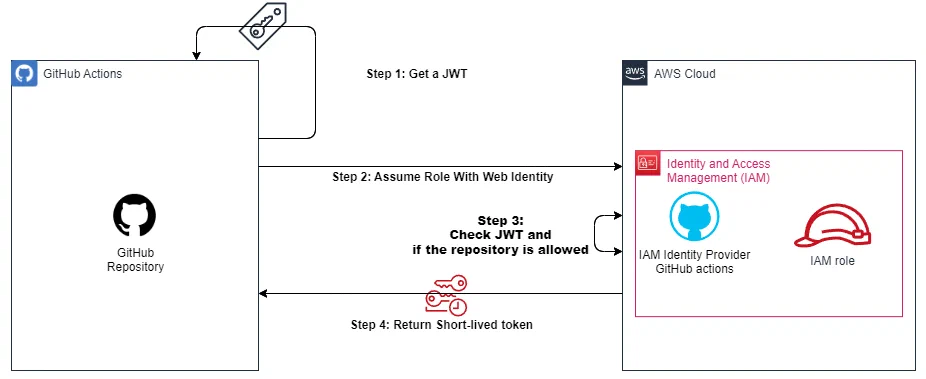 We will complete our GitHub Action Workflow with the action [configure-aws-credentials-for-github-actions](https://github.com/aws-actions/configure-aws-credentials#configure-aws-credentials-for-github-actions).
To do this, you need to:
1. Grant **permission** to your workflow to use a [JSON Web Token](https://jwt.io/) GitHub.
2. Add the **step** with our GitHub Action [configure-aws-credentials-for-github-actions](https://github.com/aws-actions/configure-aws-credentials#configure-aws-credentials-for-github-actions) provisioning our `aws_role_arn` as a parameter to the step.
This results in the final and functional configuration as follows:
```yaml
name: Hugo deploy website on S3
on:
push:
branches: [ main ]
permissions:
id-token: write # This is required for requesting the JWT
contents: read # This is required for actions/checkout
jobs:
Build_and_Deploy:
runs-on: ubuntu-latest
steps:
# Checks-out your repository under $GITHUB_WORKSPACE, so your job can access it
- name: Git clone the repository
uses: actions/checkout@v4
with:
submodules: 'true'
- name: configure aws credentials
uses: aws-actions/configure-aws-credentials@v4
with:
role-to-assume: arn:aws:iam::012345678912:role/GitHubOIDCRole # To replace with aws_role_arn
role-session-name: githubActionHugoDeploy
aws-region: eu-west-3
# Sets up Hugo with latest version
- name: Setup Hugo
uses: peaceiris/actions-hugo@v2
with:
hugo-version: 'latest'
extended: true
- name: Build
run: hugo --minify
- name: Deploy to S3
run: hugo deploy --force
```
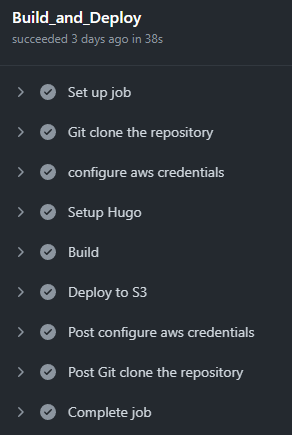
With the following result, after a `git push` via GitHub Action:
We will complete our GitHub Action Workflow with the action [configure-aws-credentials-for-github-actions](https://github.com/aws-actions/configure-aws-credentials#configure-aws-credentials-for-github-actions).
To do this, you need to:
1. Grant **permission** to your workflow to use a [JSON Web Token](https://jwt.io/) GitHub.
2. Add the **step** with our GitHub Action [configure-aws-credentials-for-github-actions](https://github.com/aws-actions/configure-aws-credentials#configure-aws-credentials-for-github-actions) provisioning our `aws_role_arn` as a parameter to the step.
This results in the final and functional configuration as follows:
```yaml
name: Hugo deploy website on S3
on:
push:
branches: [ main ]
permissions:
id-token: write # This is required for requesting the JWT
contents: read # This is required for actions/checkout
jobs:
Build_and_Deploy:
runs-on: ubuntu-latest
steps:
# Checks-out your repository under $GITHUB_WORKSPACE, so your job can access it
- name: Git clone the repository
uses: actions/checkout@v4
with:
submodules: 'true'
- name: configure aws credentials
uses: aws-actions/configure-aws-credentials@v4
with:
role-to-assume: arn:aws:iam::012345678912:role/GitHubOIDCRole # To replace with aws_role_arn
role-session-name: githubActionHugoDeploy
aws-region: eu-west-3
# Sets up Hugo with latest version
- name: Setup Hugo
uses: peaceiris/actions-hugo@v2
with:
hugo-version: 'latest'
extended: true
- name: Build
run: hugo --minify
- name: Deploy to S3
run: hugo deploy --force
```
With the following result, after a `git push` via GitHub Action:
 ## Auto setup of ACM (AWS Certificate Manager)
In the construction of the website, we assumed in the [previous article](https://mehdilaruelle.com/posts/2022/08/deploy-your-hugo-site-on-aws-with-terraform/)
that the domain name (or subdomain) is hosted on Amazon Route 53, and the [Hosted Zone](https://docs.aws.amazon.com/Route53/latest/DeveloperGuide/AboutHZWorkingWith.html) must be created manually.
Until recently, creating the certificate in AWS Certificate Manager (ACM) was also a manual process.
This changed following [this commit](https://github.com/mehdilaruelle/terraform-aws-hugo-website/commit/620f4256444457dac919c93535a9a83d91996e05),
which can be summarized through the following snippet:
```hcl
resource "aws_acm_certificate" "hugo" {
provider = aws.aws_cloudfront # CloudFront uses certificates from US-EAST-1 region only
domain_name = local.dns_name
validation_method = "DNS"
}
resource "aws_route53_record" "hugo" {
for_each = {
for dvo in aws_acm_certificate.hugo.domain_validation_options : dvo.domain_name => {
name = dvo.resource_record_name
record = dvo.resource_record_value
type = dvo.resource_record_type
}
}
allow_overwrite = true
name = each.value.name
records = [each.value.record]
ttl = 60
type = each.value.type
zone_id = data.aws_route53_zone.hugo.zone_id
}
resource "aws_acm_certificate_validation" "hugo" {
provider = aws.aws_cloudfront # CloudFront uses certificates from US-EAST-1 region only
certificate_arn = aws_acm_certificate.hugo.arn
validation_record_fqdns = [for record in aws_route53_record.hugo : record.fqdn]
}
```
## Auto setup of ACM (AWS Certificate Manager)
In the construction of the website, we assumed in the [previous article](https://mehdilaruelle.com/posts/2022/08/deploy-your-hugo-site-on-aws-with-terraform/)
that the domain name (or subdomain) is hosted on Amazon Route 53, and the [Hosted Zone](https://docs.aws.amazon.com/Route53/latest/DeveloperGuide/AboutHZWorkingWith.html) must be created manually.
Until recently, creating the certificate in AWS Certificate Manager (ACM) was also a manual process.
This changed following [this commit](https://github.com/mehdilaruelle/terraform-aws-hugo-website/commit/620f4256444457dac919c93535a9a83d91996e05),
which can be summarized through the following snippet:
```hcl
resource "aws_acm_certificate" "hugo" {
provider = aws.aws_cloudfront # CloudFront uses certificates from US-EAST-1 region only
domain_name = local.dns_name
validation_method = "DNS"
}
resource "aws_route53_record" "hugo" {
for_each = {
for dvo in aws_acm_certificate.hugo.domain_validation_options : dvo.domain_name => {
name = dvo.resource_record_name
record = dvo.resource_record_value
type = dvo.resource_record_type
}
}
allow_overwrite = true
name = each.value.name
records = [each.value.record]
ttl = 60
type = each.value.type
zone_id = data.aws_route53_zone.hugo.zone_id
}
resource "aws_acm_certificate_validation" "hugo" {
provider = aws.aws_cloudfront # CloudFront uses certificates from US-EAST-1 region only
certificate_arn = aws_acm_certificate.hugo.arn
validation_record_fqdns = [for record in aws_route53_record.hugo : record.fqdn]
}
```
Info
You can find this snippet directly in the official HashiCorp documentation.
Info
In the Terraform repository for deploying this site, pre-commit-terraform is used.