# Terraform Registry Protocol
> How Terraform finds and downloads a provider: the registry protocol, network mirrors and filesystem mirrors, explained from the HTTP calls up.
2021-12-20 · Terraform, HashiCorp
Terraform is an open-source IaC (Infrastructure as Code) tool. This one works
through providers that complete the tool to interact with the various cloud providers,
SaaS providers and many more. Terraform uses, for its providers, a particular and
open source protocol. How does it work? What is behind this protocol?
## Introduction
In this article, we will see how Terraform uses [Providers](https://www.terraform.io/docs/language/providers/index.html)
through the [Terraform public registry](https://registry.terraform.io/),
then the different types of registry protocols that can be used.
It is possible to extend this method to use [Terraform Modules](https://www.terraform.io/docs/language/modules/syntax.html)
but the subject is not covered here. For more information on the subject, you can
[learn more about the official documentation](https://www.terraform.io/docs/internals/module-registry-protocol.html).
## Prerequisite
**Terraform** side:
- **Know the basics**. If you don't know Terraform, I invite you to try the
[interactive learning on the official website of HashiCorp Terraform](https://learn.hashicorp.com/terraform).
- **Terraform [providers](https://www.terraform.io/docs/language/providers/index.html)**.
If the notion of provider seems vague to you, it may be interesting
[to take a look at the documentation](https://www.terraform.io/docs/language/providers/configuration.html).
## How does Terraform work with the registry?
To work, Terraform needs to retrieve and use providers to interact with target platforms:
 (From: [https://www.terraform.io/docs/extend/index.html](/terraform-registry/terraform-plugin.png))
The recovery of these providers goes by default through the [Terraform public registry](https://registry.terraform.io/)
(which we will name here simply **Terraform registry**), which is managed by
HashiCorp and accessible via the internet.
For the Terraform user, retrieving the provider is quite trivial
and can be similar to a simple "download" (through the command `terraform init`).
In reality, the actions carried out by Terraform are much more numerous and complex.
Terraform interacts with the registry via
[a particular protocol that is defined in the Terraform documentation](https://www.terraform.io/docs/internals/provider-registry-protocol.html).
To avoid reading all the documentation, I have prepared a diagram for you which
traces the main steps between Terraform core and the registry:
(From: [https://www.terraform.io/docs/extend/index.html](/terraform-registry/terraform-plugin.png))
The recovery of these providers goes by default through the [Terraform public registry](https://registry.terraform.io/)
(which we will name here simply **Terraform registry**), which is managed by
HashiCorp and accessible via the internet.
For the Terraform user, retrieving the provider is quite trivial
and can be similar to a simple "download" (through the command `terraform init`).
In reality, the actions carried out by Terraform are much more numerous and complex.
Terraform interacts with the registry via
[a particular protocol that is defined in the Terraform documentation](https://www.terraform.io/docs/internals/provider-registry-protocol.html).
To avoid reading all the documentation, I have prepared a diagram for you which
traces the main steps between Terraform core and the registry:
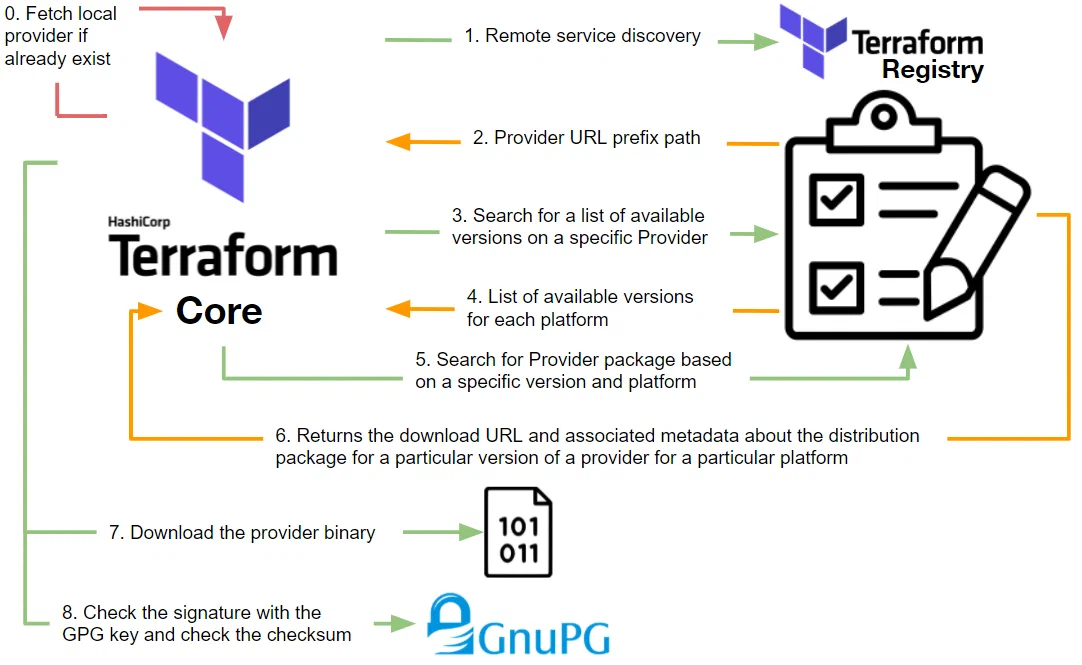 As you will have understood, the interactions are more numerous and more complex
than a simple binary download.
## The differences between registry protocols
There are several types of registry protocols:
- **Provider/module registry protocol**: the protocol used by [https://app.terraform.io](https://app.terraform.io )
(Terraform Registry) and the most complete. The protocol we have described above
represents this one. By using this protocol you will be able to provide your Terraform
users with providers and modules. In addition to this it is possible to verify
the signature of the providers and also store providers binaries in a location
other than the registry.
[More information about the protocol and providers in the official HashiCorp documentation](https://www.terraform.io/docs/internals/provider-registry-protocol.html).
- **Provider network mirror protocol**: a lighter version of the above protocol.
It makes it possible to make providers available to Terraform users without
checking the origin and/or signature of the provider. This one can be a good
choice if you want to have an accessible and simple private Provider registry without
publishing providers for third parties.
**It is not yet possible (at the time of writing) to use this protocol for modules**.
[More information about the protocol on the official HashiCorp documentation](https://www.terraform.io/docs/internals/provider-network-mirror-protocol.html).
- **Provider filesystem mirror**: In the same logic as the Provider network mirror
protocol except that the storage and access of providers is done via a filesystem.
Practical in some cases where local use makes sense, but it rapidly reaches its limits at scale.
[More information about the provider filesystem mirror on the official HashiCorp documentation](https://www.terraform.io/docs/cli/config/config-file.html#filesystem_mirror).
The diagram summarizes the previous remarks:
As you will have understood, the interactions are more numerous and more complex
than a simple binary download.
## The differences between registry protocols
There are several types of registry protocols:
- **Provider/module registry protocol**: the protocol used by [https://app.terraform.io](https://app.terraform.io )
(Terraform Registry) and the most complete. The protocol we have described above
represents this one. By using this protocol you will be able to provide your Terraform
users with providers and modules. In addition to this it is possible to verify
the signature of the providers and also store providers binaries in a location
other than the registry.
[More information about the protocol and providers in the official HashiCorp documentation](https://www.terraform.io/docs/internals/provider-registry-protocol.html).
- **Provider network mirror protocol**: a lighter version of the above protocol.
It makes it possible to make providers available to Terraform users without
checking the origin and/or signature of the provider. This one can be a good
choice if you want to have an accessible and simple private Provider registry without
publishing providers for third parties.
**It is not yet possible (at the time of writing) to use this protocol for modules**.
[More information about the protocol on the official HashiCorp documentation](https://www.terraform.io/docs/internals/provider-network-mirror-protocol.html).
- **Provider filesystem mirror**: In the same logic as the Provider network mirror
protocol except that the storage and access of providers is done via a filesystem.
Practical in some cases where local use makes sense, but it rapidly reaches its limits at scale.
[More information about the provider filesystem mirror on the official HashiCorp documentation](https://www.terraform.io/docs/cli/config/config-file.html#filesystem_mirror).
The diagram summarizes the previous remarks:
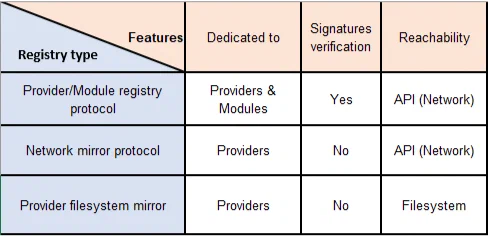 Note that the Network Mirror Protocol is less complete than the Provider/Module
Registry Protocol but is much easier.
## Authentication to the registry
With the exception of the Provider filesystem mirror, it is possible to implement the
[Login Protocol](https://www.terraform.io/internals/login-protocol)
in your registry to allow certain API calls only if your users are authenticated.
The protocol is based on [OAuth 2.0](https://oauth.net/2/) and only supports the
[Code Grant](https://datatracker.ietf.org/doc/html/rfc6749#section-4.1) permission type,
with some limitations:
- **Refresh tokens** are not supported. The user will need to authenticate again.
- **Token expiration** is not supported.
Through the command `terraform login`, the user is able to authenticate to an OAuth
server. In particular, the command supports
[Proof Key for Code Exchange](https://tools.ietf.org/html/rfc7636) to protect request interceptions.
Finally, it is important to note that the token retrieved from authentication
is obtained on the user side and, on the other hand, that it will be necessary to add to
your registry a mechanism to check the validity of the token on the target APIs.
## Go beyond
In particular, we have seen how the Registry Protocol works and its different forms.
For those who want to go further, it is possible to set up a
[Provider Registry as a static website](https://www.terraform.io/docs/internals/provider-network-mirror-protocol.html#provider-mirror-as-a-static-website),
quite simply. With some exceptions, if you implement a [Login Protocol](https://www.terraform.io/docs/internals/provider-network-mirror-protocol.html#provider-mirror-as-a-static-website), which will require setting up a mechanism to check the token validity
on the target APIs.
Finally, for those who want to implement the protocol registry, you can base it on
the following GitHub repository: [https://github.com/apparentlymart/terraform-aws-tf-registry](https://github.com/apparentlymart/terraform-aws-tf-registry)
---
Originally published at https://mehdilaruelle.com/posts/2021/12/terraform-registry-protocol/
Note that the Network Mirror Protocol is less complete than the Provider/Module
Registry Protocol but is much easier.
## Authentication to the registry
With the exception of the Provider filesystem mirror, it is possible to implement the
[Login Protocol](https://www.terraform.io/internals/login-protocol)
in your registry to allow certain API calls only if your users are authenticated.
The protocol is based on [OAuth 2.0](https://oauth.net/2/) and only supports the
[Code Grant](https://datatracker.ietf.org/doc/html/rfc6749#section-4.1) permission type,
with some limitations:
- **Refresh tokens** are not supported. The user will need to authenticate again.
- **Token expiration** is not supported.
Through the command `terraform login`, the user is able to authenticate to an OAuth
server. In particular, the command supports
[Proof Key for Code Exchange](https://tools.ietf.org/html/rfc7636) to protect request interceptions.
Finally, it is important to note that the token retrieved from authentication
is obtained on the user side and, on the other hand, that it will be necessary to add to
your registry a mechanism to check the validity of the token on the target APIs.
## Go beyond
In particular, we have seen how the Registry Protocol works and its different forms.
For those who want to go further, it is possible to set up a
[Provider Registry as a static website](https://www.terraform.io/docs/internals/provider-network-mirror-protocol.html#provider-mirror-as-a-static-website),
quite simply. With some exceptions, if you implement a [Login Protocol](https://www.terraform.io/docs/internals/provider-network-mirror-protocol.html#provider-mirror-as-a-static-website), which will require setting up a mechanism to check the token validity
on the target APIs.
Finally, for those who want to implement the protocol registry, you can base it on
the following GitHub repository: [https://github.com/apparentlymart/terraform-aws-tf-registry](https://github.com/apparentlymart/terraform-aws-tf-registry)
---
Originally published at https://mehdilaruelle.com/posts/2021/12/terraform-registry-protocol/