# Secure your Terraform deployment on AWS with Gitlab-CI and Vault (application side)
> Retrieve database secrets from HashiCorp Vault on the application side of a GitLab CI deployment, with Vault Agent and JWT authentication.
2021-04-01 · Vault, Terraform, CI-CD, AWS
How to secure your Terraform deployment on AWS through Gitlab-CI and the help of Vault? We saw, [in the previous post](https://mehdilaruelle.com/posts/2021/03/secure-your-terraform-deployment-on-aws-with-gitlab-ci-and-vault-pipeline-side/), how to solve these problems on the pipeline side with Gitlab-CI and Vault. In this article, we'll cover secret retrieval from the application side.
## The challenge on the application side
We were able to see [in the previous post](https://mehdilaruelle.com/posts/2021/03/secure-your-terraform-deployment-on-aws-with-gitlab-ci-and-vault-pipeline-side/) how to solve the various problems encountered at the pipeline level. However our CI with Gitlab is not limited to the deployment of the infrastructure, but also includes the application itself.
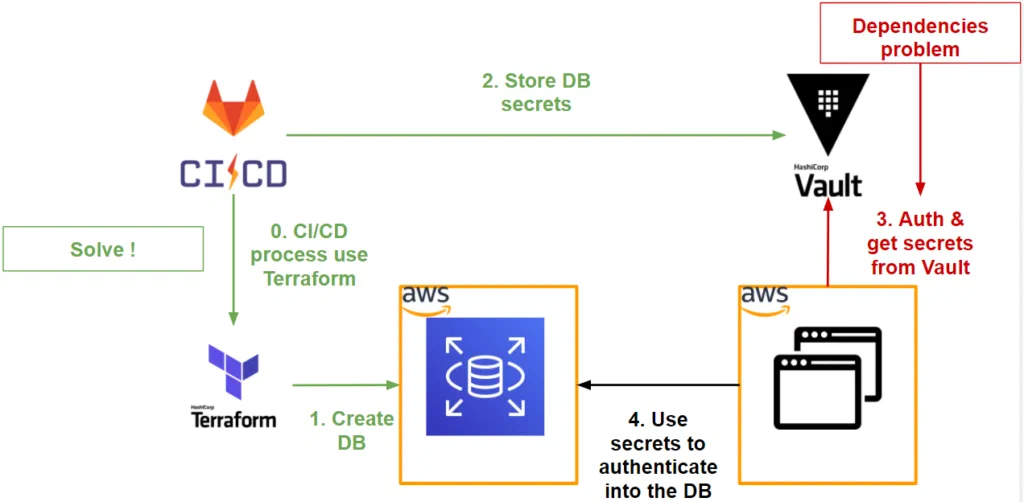
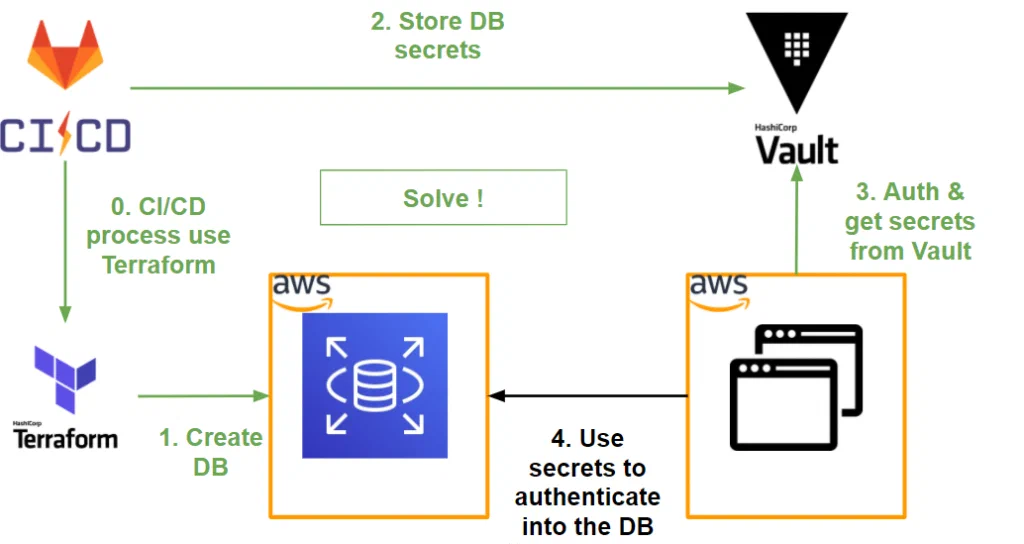
If we do a recap of what we have managed to do so far at the workflow level, we have the following diagram:
As we can see, our application needs to retrieve the secrets stored in Vault to be able to connect to the database.
However, we want the interaction with the application and Vault to be as transparent as possible and for that we need to reduce dependencies:
- **At the authentication level**: which method to choose with our application to make it as transparent and secure as possible?
- **At secrets usage level**: how to recover a dynamic secret (short TTL) without impacting the application code?
## Authentication of our application
When it comes to authenticating our application with Vault, if we want it to be as transparent and secure as possible, it is important to base ourselves on the environment where our application is deployed.
Our application is deployed on AWS, which is perfect because on the Vault side we have an [AWS authentication method](https://www.vaultproject.io/docs/auth/aws).
This authentication method takes place in 2 types: **IAM** and **EC2**.
As our application is deployed on an EC2 instance, we will use the EC2 type.
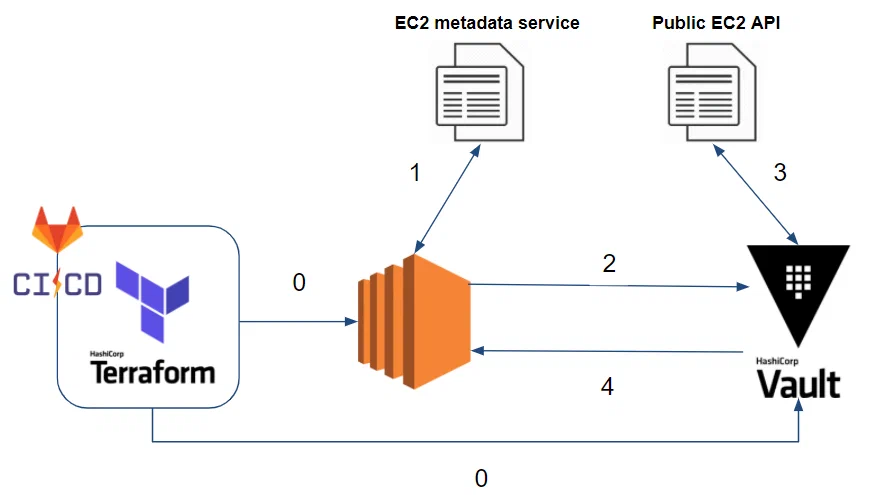
If we take a close look at how this method works, we have the following scenario:
0. So far our Gitlab-CI, through Terraform, has deployed our application in an EC2 instance and has stored database secrets in Vault.
1. Our EC2 instance, once deployed, obtains its metadata through the EC2 metadata service (eg: Instance ID, subnet and VPC ID where our EC2 instance is deployed, etc.). You can find more details on the [AWS official documentation](https://docs.aws.amazon.com/AWSEC2/latest/UserGuide/ec2-instance-metadata.html).
2. Our application authenticates to Vault through the AWS EC2 method [using a PKCS7 signature](https://docs.aws.amazon.com/AWSEC2/latest/UserGuide/verify-pkcs7.html).
3. Vault verifies the identity and that the EC2 instance hosting our application respects our authentication conditions (**bound parameters**) (eg: Is it in the correct VPC and subnet? Is it the correct instance ID? etc.)
4. If authentication is successful, Vault returns a token.
To set up this authentication method, you must:
- Make sure **Vault is able to verify the identity and metadata of the EC2 instance** on the target AWS account.
- **Indicate the authentication conditions (bound parameters)** to Vault on which we want to allow the application to authenticate.
### Identity and metadata verification
For Vault to be able to verify the information of our EC2 instance, it needs rights (IAM) on the target account in order to describe the concerned instance via the following action: **ec2:DescribeInstances**.
To do this, and stay in the same logic as in our previous demonstrations, we will create an IAM role on which Vault will assume this role.
The IAM role should contain the following policy:
```json
{
"Version": "2012-10-17",
"Statement": [
{
"Effect": "Allow",
"Action": [
"ec2:DescribeInstances"
],
"Resource": "*"
}
]
}
```
As well as [Trust Relationships](https://aws.amazon.com/fr/blogs/security/how-to-use-trust-policies-with-iam-roles/) authorizing the source account (where Vault is located) to assume the IAM role.
On the Vault configuration side, we [configure it through Terraform](https://github.com/mehdilaruelle/vault-aws-gitlab-secret/blob/master/terraform/vault-admin/jwt_gitlab.tf):
```hcl
resource "vault_auth_backend" "aws" {
description = "Auth backend to auth project in AWS env"
type = "aws"
path = "${var.project_name}-aws"
}
resource "vault_aws_auth_backend_sts_role" "role" {
backend = vault_auth_backend.aws.path
account_id = split(":", var.vault_aws_assume_role)[4]
sts_role = var.vault_aws_assume_role
}
```
As we can see, we also indicate the IAM role (STS) that Vault should assume.
At this point, Vault is able to verify the information of our EC2 instance.
### Set authentication constraints (Bound parameters)
In terms of security, under what conditions do we allow our application to authenticate with Vault to retrieve its secrets?
If we take a closer look at Vault’s EC2-type AWS authentication method, we can rely on [several criteria](https://www.vaultproject.io/api/auth/aws#parameters-10), such as: **AMI ID**, **account ID**, **region**, **VPC ID**, **subnet ID**, **ARN IAM role**, **ARN instance profile** or **ID of the EC2 instance**.
We can indicate several criteria and several values for each criterion. For authentication to be accepted by Vault, a value for each criterion must be met.
In our case, our EC2 instance is deployed by Terraform. This is ideal, because through Terraform we are able to retrieve all the attributes of our instance and specify them on the Vault side as **bound parameters**.
Which gives us the [Terraform snippet](https://github.com/mehdilaruelle/vault-aws-gitlab-secret/blob/master/terraform/project/vault.tf) in order to create the Vault role for our AWS authentication backend:
```hcl
resource "vault_aws_auth_backend_role" "web" {
backend = local.aws_backend
role = var.project_name
auth_type = "ec2"
bound_ami_ids = [data.aws_ami.amazon-linux-2.id]
bound_account_ids = [data.aws_caller_identity.current.account_id]
bound_vpc_ids = [data.aws_vpc.default.id]
bound_subnet_ids = [aws_instance.web.subnet_id]
bound_region = var.region
token_ttl = var.project_token_ttl
token_max_ttl = var.project_token_max_ttl
token_policies = ["default", var.project_name]
}
```
In our case, we are relying on the **AMI ID**, **VPC ID**, **subnet ID**, and **AWS region**. We could have added the instance ID to strengthen the security of our authentication, but this criterion should be avoided within an [Auto Scaling Group](https://docs.aws.amazon.com/autoscaling/ec2/userguide/AutoScalingGroup.html).
At this point, our application is able to authenticate and retrieve its secrets from the Vault.
## Secrets usage in our application
On the side of Vault integration at the level of our application, we will use the [Vault agent](https://developer.hashicorp.com/vault/docs/agent-and-proxy/agent).
For those who want more details with Vault Agent integration, you can refer to the [next post](https://mehdilaruelle.com/posts/2021/02/how-to-reduce-code-dependency-with-vault-agent/).
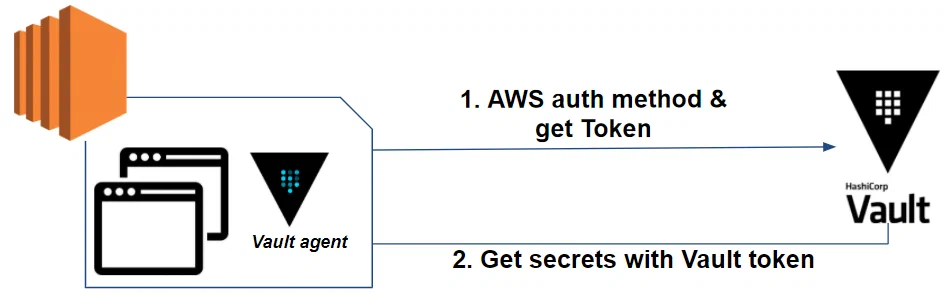
Let's take a closer look at our app's workflow with Vault:
As we can see, Vault agent takes care of 2 phases:
- **Authentication** of the AWS method with Vault as well as the rotation of the Vault token
- **Retrieving** secrets and refreshing them
We have the following [Vault Agent configuration](https://github.com/mehdilaruelle/vault-aws-gitlab-secret/blob/master/terraform/project/userdata.sh):
```hcl
auto_auth {
method {
mount_path = "auth/${vault_auth_path}"
type = "aws"
config = {
type = "ec2"
role = "web"
}
}
sink {
type = "file"
config = {
path = "/home/ec2-user/.vault-token"
}
}
}
template {
source = "/var/www/secrets.tpl"
destination = "/var/www/secrets.json"
}
```
This file can be templatized by Terraform in order to replace certain values such as the name of the **Vault role** or the **mount_path**.
And finally, on the [secret template side](https://github.com/mehdilaruelle/vault-aws-gitlab-secret/blob/master/terraform/project/userdata.sh), we want to retrieve the secrets in JSON format which gives us the following format:
```jinja2
{
{{ with secret "web-db/creds/web" }}
"username":"{{ .Data.username }}",
"password":"{{ .Data.password }}",
"db_host":"${db_host}",
"db_name":"${db_name}"
{{ end }}
}
```
Vault agent takes care of everything related to Vault (Vault token, secrets, refresh, etc.) [thus leaving our application just to retrieve its secrets in the concerned file](https://github.com/mehdilaruelle/vault-aws-gitlab-secret/blob/master/terraform/project/userdata.sh):
```php
if (file_exists("/var/www/secrets.json")) {
$secrets_json = file_get_contents("/var/www/secrets.json", "r");
$user = json_decode($secrets_json)->{'username'};
$pass = json_decode($secrets_json)->{'password'};
$host = json_decode($secrets_json)->{'db_host'};
$dbname = json_decode($secrets_json)->{'db_name'};
}
else{
echo "Secrets not found.";
exit;
}
```
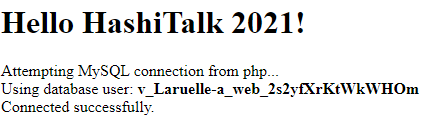
Which gives us the expected result:
## Key takeaways
Compared to what we have managed to do so far, we have the following workflow:
- [Terraform has a Vault provider](https://registry.terraform.io/providers/hashicorp/vault/latest/docs) to simplify the interaction between the two tools.
- It is possible to authenticate a pipeline or even a specific branch of a Gitlab-CI job with Vault via the [JWT authentication method](https://docs.gitlab.com/ci/secrets/hashicorp_vault/).
- Vault allows you to [generate cloud provider credentials](https://www.vaultproject.io/docs/secrets) to deploy IaC through Terraform. [Regarding AWS](https://www.vaultproject.io/docs/secrets/aws), it is able to assume IAM roles on multiple AWS accounts allowing our Terraform to deploy IaC on multiple AWS accounts.
- Vault allows you to [centralize several types of secrets](https://www.vaultproject.io/docs/secrets) for a project regardless of the environment, including the secrets generated by the IaC.
- [Vault agent simplifies Vault integration](https://developer.hashicorp.com/vault/docs/agent-and-proxy/agent) in an application by taking care of authentication and the lifecycle of secrets.
- The Vault token used by the Vault Agent has a short lifespan and changes often.
- The secrets of the application ([Database](https://www.vaultproject.io/docs/secrets/databases) in our example) have a short lifespan and are updated often through the Vault Agent.
- We allow our app to authenticate to Vault based on the environment it is in. [About our application in AWS](https://www.vaultproject.io/docs/auth/aws), we rely on **AWS EC2 authentication method** and **bound parameters** such as the subnet ID where our application is located, the VPC ID, the AWS region, etc.
As we have seen in this post, Vault allows us to secure our Terraform through Gitlab-CI from end to end including the IaC or even our application itself.
Also, Vault agent allows us to reduce application dependencies with Vault.
Used the right way, this integration can be seamless for ops, dev and apps. Secrets become transparent to everyone and with a **short lifecycle**.
**Why seek to know a secret** if we can have transparent Secret as a Service?
---
Originally published at https://mehdilaruelle.com/posts/2021/04/secure-your-terraform-deployment-on-aws-with-gitlab-ci-and-vault-application-side/
 As we can see, our application needs to retrieve the secrets stored in Vault to be able to connect to the database.
However, we want the interaction with the application and Vault to be as transparent as possible and for that we need to reduce dependencies:
- **At the authentication level**: which method to choose with our application to make it as transparent and secure as possible?
- **At secrets usage level**: how to recover a dynamic secret (short TTL) without impacting the application code?
## Authentication of our application
When it comes to authenticating our application with Vault, if we want it to be as transparent and secure as possible, it is important to base ourselves on the environment where our application is deployed.
Our application is deployed on AWS, which is perfect because on the Vault side we have an [AWS authentication method](https://www.vaultproject.io/docs/auth/aws).
This authentication method takes place in 2 types: **IAM** and **EC2**.
As our application is deployed on an EC2 instance, we will use the EC2 type.
If we take a close look at how this method works, we have the following scenario:
As we can see, our application needs to retrieve the secrets stored in Vault to be able to connect to the database.
However, we want the interaction with the application and Vault to be as transparent as possible and for that we need to reduce dependencies:
- **At the authentication level**: which method to choose with our application to make it as transparent and secure as possible?
- **At secrets usage level**: how to recover a dynamic secret (short TTL) without impacting the application code?
## Authentication of our application
When it comes to authenticating our application with Vault, if we want it to be as transparent and secure as possible, it is important to base ourselves on the environment where our application is deployed.
Our application is deployed on AWS, which is perfect because on the Vault side we have an [AWS authentication method](https://www.vaultproject.io/docs/auth/aws).
This authentication method takes place in 2 types: **IAM** and **EC2**.
As our application is deployed on an EC2 instance, we will use the EC2 type.
If we take a close look at how this method works, we have the following scenario:
 0. So far our Gitlab-CI, through Terraform, has deployed our application in an EC2 instance and has stored database secrets in Vault.
1. Our EC2 instance, once deployed, obtains its metadata through the EC2 metadata service (eg: Instance ID, subnet and VPC ID where our EC2 instance is deployed, etc.). You can find more details on the [AWS official documentation](https://docs.aws.amazon.com/AWSEC2/latest/UserGuide/ec2-instance-metadata.html).
2. Our application authenticates to Vault through the AWS EC2 method [using a PKCS7 signature](https://docs.aws.amazon.com/AWSEC2/latest/UserGuide/verify-pkcs7.html).
3. Vault verifies the identity and that the EC2 instance hosting our application respects our authentication conditions (**bound parameters**) (eg: Is it in the correct VPC and subnet? Is it the correct instance ID? etc.)
4. If authentication is successful, Vault returns a token.
To set up this authentication method, you must:
- Make sure **Vault is able to verify the identity and metadata of the EC2 instance** on the target AWS account.
- **Indicate the authentication conditions (bound parameters)** to Vault on which we want to allow the application to authenticate.
### Identity and metadata verification
For Vault to be able to verify the information of our EC2 instance, it needs rights (IAM) on the target account in order to describe the concerned instance via the following action: **ec2:DescribeInstances**.
To do this, and stay in the same logic as in our previous demonstrations, we will create an IAM role on which Vault will assume this role.
The IAM role should contain the following policy:
```json
{
"Version": "2012-10-17",
"Statement": [
{
"Effect": "Allow",
"Action": [
"ec2:DescribeInstances"
],
"Resource": "*"
}
]
}
```
As well as [Trust Relationships](https://aws.amazon.com/fr/blogs/security/how-to-use-trust-policies-with-iam-roles/) authorizing the source account (where Vault is located) to assume the IAM role.
On the Vault configuration side, we [configure it through Terraform](https://github.com/mehdilaruelle/vault-aws-gitlab-secret/blob/master/terraform/vault-admin/jwt_gitlab.tf):
```hcl
resource "vault_auth_backend" "aws" {
description = "Auth backend to auth project in AWS env"
type = "aws"
path = "${var.project_name}-aws"
}
resource "vault_aws_auth_backend_sts_role" "role" {
backend = vault_auth_backend.aws.path
account_id = split(":", var.vault_aws_assume_role)[4]
sts_role = var.vault_aws_assume_role
}
```
As we can see, we also indicate the IAM role (STS) that Vault should assume.
At this point, Vault is able to verify the information of our EC2 instance.
### Set authentication constraints (Bound parameters)
In terms of security, under what conditions do we allow our application to authenticate with Vault to retrieve its secrets?
If we take a closer look at Vault’s EC2-type AWS authentication method, we can rely on [several criteria](https://www.vaultproject.io/api/auth/aws#parameters-10), such as: **AMI ID**, **account ID**, **region**, **VPC ID**, **subnet ID**, **ARN IAM role**, **ARN instance profile** or **ID of the EC2 instance**.
We can indicate several criteria and several values for each criterion. For authentication to be accepted by Vault, a value for each criterion must be met.
In our case, our EC2 instance is deployed by Terraform. This is ideal, because through Terraform we are able to retrieve all the attributes of our instance and specify them on the Vault side as **bound parameters**.
Which gives us the [Terraform snippet](https://github.com/mehdilaruelle/vault-aws-gitlab-secret/blob/master/terraform/project/vault.tf) in order to create the Vault role for our AWS authentication backend:
```hcl
resource "vault_aws_auth_backend_role" "web" {
backend = local.aws_backend
role = var.project_name
auth_type = "ec2"
bound_ami_ids = [data.aws_ami.amazon-linux-2.id]
bound_account_ids = [data.aws_caller_identity.current.account_id]
bound_vpc_ids = [data.aws_vpc.default.id]
bound_subnet_ids = [aws_instance.web.subnet_id]
bound_region = var.region
token_ttl = var.project_token_ttl
token_max_ttl = var.project_token_max_ttl
token_policies = ["default", var.project_name]
}
```
In our case, we are relying on the **AMI ID**, **VPC ID**, **subnet ID**, and **AWS region**. We could have added the instance ID to strengthen the security of our authentication, but this criterion should be avoided within an [Auto Scaling Group](https://docs.aws.amazon.com/autoscaling/ec2/userguide/AutoScalingGroup.html).
At this point, our application is able to authenticate and retrieve its secrets from the Vault.
## Secrets usage in our application
On the side of Vault integration at the level of our application, we will use the [Vault agent](https://developer.hashicorp.com/vault/docs/agent-and-proxy/agent).
For those who want more details with Vault Agent integration, you can refer to the [next post](https://mehdilaruelle.com/posts/2021/02/how-to-reduce-code-dependency-with-vault-agent/).
Let's take a closer look at our app's workflow with Vault:
0. So far our Gitlab-CI, through Terraform, has deployed our application in an EC2 instance and has stored database secrets in Vault.
1. Our EC2 instance, once deployed, obtains its metadata through the EC2 metadata service (eg: Instance ID, subnet and VPC ID where our EC2 instance is deployed, etc.). You can find more details on the [AWS official documentation](https://docs.aws.amazon.com/AWSEC2/latest/UserGuide/ec2-instance-metadata.html).
2. Our application authenticates to Vault through the AWS EC2 method [using a PKCS7 signature](https://docs.aws.amazon.com/AWSEC2/latest/UserGuide/verify-pkcs7.html).
3. Vault verifies the identity and that the EC2 instance hosting our application respects our authentication conditions (**bound parameters**) (eg: Is it in the correct VPC and subnet? Is it the correct instance ID? etc.)
4. If authentication is successful, Vault returns a token.
To set up this authentication method, you must:
- Make sure **Vault is able to verify the identity and metadata of the EC2 instance** on the target AWS account.
- **Indicate the authentication conditions (bound parameters)** to Vault on which we want to allow the application to authenticate.
### Identity and metadata verification
For Vault to be able to verify the information of our EC2 instance, it needs rights (IAM) on the target account in order to describe the concerned instance via the following action: **ec2:DescribeInstances**.
To do this, and stay in the same logic as in our previous demonstrations, we will create an IAM role on which Vault will assume this role.
The IAM role should contain the following policy:
```json
{
"Version": "2012-10-17",
"Statement": [
{
"Effect": "Allow",
"Action": [
"ec2:DescribeInstances"
],
"Resource": "*"
}
]
}
```
As well as [Trust Relationships](https://aws.amazon.com/fr/blogs/security/how-to-use-trust-policies-with-iam-roles/) authorizing the source account (where Vault is located) to assume the IAM role.
On the Vault configuration side, we [configure it through Terraform](https://github.com/mehdilaruelle/vault-aws-gitlab-secret/blob/master/terraform/vault-admin/jwt_gitlab.tf):
```hcl
resource "vault_auth_backend" "aws" {
description = "Auth backend to auth project in AWS env"
type = "aws"
path = "${var.project_name}-aws"
}
resource "vault_aws_auth_backend_sts_role" "role" {
backend = vault_auth_backend.aws.path
account_id = split(":", var.vault_aws_assume_role)[4]
sts_role = var.vault_aws_assume_role
}
```
As we can see, we also indicate the IAM role (STS) that Vault should assume.
At this point, Vault is able to verify the information of our EC2 instance.
### Set authentication constraints (Bound parameters)
In terms of security, under what conditions do we allow our application to authenticate with Vault to retrieve its secrets?
If we take a closer look at Vault’s EC2-type AWS authentication method, we can rely on [several criteria](https://www.vaultproject.io/api/auth/aws#parameters-10), such as: **AMI ID**, **account ID**, **region**, **VPC ID**, **subnet ID**, **ARN IAM role**, **ARN instance profile** or **ID of the EC2 instance**.
We can indicate several criteria and several values for each criterion. For authentication to be accepted by Vault, a value for each criterion must be met.
In our case, our EC2 instance is deployed by Terraform. This is ideal, because through Terraform we are able to retrieve all the attributes of our instance and specify them on the Vault side as **bound parameters**.
Which gives us the [Terraform snippet](https://github.com/mehdilaruelle/vault-aws-gitlab-secret/blob/master/terraform/project/vault.tf) in order to create the Vault role for our AWS authentication backend:
```hcl
resource "vault_aws_auth_backend_role" "web" {
backend = local.aws_backend
role = var.project_name
auth_type = "ec2"
bound_ami_ids = [data.aws_ami.amazon-linux-2.id]
bound_account_ids = [data.aws_caller_identity.current.account_id]
bound_vpc_ids = [data.aws_vpc.default.id]
bound_subnet_ids = [aws_instance.web.subnet_id]
bound_region = var.region
token_ttl = var.project_token_ttl
token_max_ttl = var.project_token_max_ttl
token_policies = ["default", var.project_name]
}
```
In our case, we are relying on the **AMI ID**, **VPC ID**, **subnet ID**, and **AWS region**. We could have added the instance ID to strengthen the security of our authentication, but this criterion should be avoided within an [Auto Scaling Group](https://docs.aws.amazon.com/autoscaling/ec2/userguide/AutoScalingGroup.html).
At this point, our application is able to authenticate and retrieve its secrets from the Vault.
## Secrets usage in our application
On the side of Vault integration at the level of our application, we will use the [Vault agent](https://developer.hashicorp.com/vault/docs/agent-and-proxy/agent).
For those who want more details with Vault Agent integration, you can refer to the [next post](https://mehdilaruelle.com/posts/2021/02/how-to-reduce-code-dependency-with-vault-agent/).
Let's take a closer look at our app's workflow with Vault:
 As we can see, Vault agent takes care of 2 phases:
- **Authentication** of the AWS method with Vault as well as the rotation of the Vault token
- **Retrieving** secrets and refreshing them
We have the following [Vault Agent configuration](https://github.com/mehdilaruelle/vault-aws-gitlab-secret/blob/master/terraform/project/userdata.sh):
```hcl
auto_auth {
method {
mount_path = "auth/${vault_auth_path}"
type = "aws"
config = {
type = "ec2"
role = "web"
}
}
sink {
type = "file"
config = {
path = "/home/ec2-user/.vault-token"
}
}
}
template {
source = "/var/www/secrets.tpl"
destination = "/var/www/secrets.json"
}
```
This file can be templatized by Terraform in order to replace certain values such as the name of the **Vault role** or the **mount_path**.
And finally, on the [secret template side](https://github.com/mehdilaruelle/vault-aws-gitlab-secret/blob/master/terraform/project/userdata.sh), we want to retrieve the secrets in JSON format which gives us the following format:
```jinja2
{
{{ with secret "web-db/creds/web" }}
"username":"{{ .Data.username }}",
"password":"{{ .Data.password }}",
"db_host":"${db_host}",
"db_name":"${db_name}"
{{ end }}
}
```
Vault agent takes care of everything related to Vault (Vault token, secrets, refresh, etc.) [thus leaving our application just to retrieve its secrets in the concerned file](https://github.com/mehdilaruelle/vault-aws-gitlab-secret/blob/master/terraform/project/userdata.sh):
```php
if (file_exists("/var/www/secrets.json")) {
$secrets_json = file_get_contents("/var/www/secrets.json", "r");
$user = json_decode($secrets_json)->{'username'};
$pass = json_decode($secrets_json)->{'password'};
$host = json_decode($secrets_json)->{'db_host'};
$dbname = json_decode($secrets_json)->{'db_name'};
}
else{
echo "Secrets not found.";
exit;
}
```
Which gives us the expected result:
As we can see, Vault agent takes care of 2 phases:
- **Authentication** of the AWS method with Vault as well as the rotation of the Vault token
- **Retrieving** secrets and refreshing them
We have the following [Vault Agent configuration](https://github.com/mehdilaruelle/vault-aws-gitlab-secret/blob/master/terraform/project/userdata.sh):
```hcl
auto_auth {
method {
mount_path = "auth/${vault_auth_path}"
type = "aws"
config = {
type = "ec2"
role = "web"
}
}
sink {
type = "file"
config = {
path = "/home/ec2-user/.vault-token"
}
}
}
template {
source = "/var/www/secrets.tpl"
destination = "/var/www/secrets.json"
}
```
This file can be templatized by Terraform in order to replace certain values such as the name of the **Vault role** or the **mount_path**.
And finally, on the [secret template side](https://github.com/mehdilaruelle/vault-aws-gitlab-secret/blob/master/terraform/project/userdata.sh), we want to retrieve the secrets in JSON format which gives us the following format:
```jinja2
{
{{ with secret "web-db/creds/web" }}
"username":"{{ .Data.username }}",
"password":"{{ .Data.password }}",
"db_host":"${db_host}",
"db_name":"${db_name}"
{{ end }}
}
```
Vault agent takes care of everything related to Vault (Vault token, secrets, refresh, etc.) [thus leaving our application just to retrieve its secrets in the concerned file](https://github.com/mehdilaruelle/vault-aws-gitlab-secret/blob/master/terraform/project/userdata.sh):
```php
if (file_exists("/var/www/secrets.json")) {
$secrets_json = file_get_contents("/var/www/secrets.json", "r");
$user = json_decode($secrets_json)->{'username'};
$pass = json_decode($secrets_json)->{'password'};
$host = json_decode($secrets_json)->{'db_host'};
$dbname = json_decode($secrets_json)->{'db_name'};
}
else{
echo "Secrets not found.";
exit;
}
```
Which gives us the expected result:
 ## Key takeaways
Compared to what we have managed to do so far, we have the following workflow:
## Key takeaways
Compared to what we have managed to do so far, we have the following workflow:
 - [Terraform has a Vault provider](https://registry.terraform.io/providers/hashicorp/vault/latest/docs) to simplify the interaction between the two tools.
- It is possible to authenticate a pipeline or even a specific branch of a Gitlab-CI job with Vault via the [JWT authentication method](https://docs.gitlab.com/ci/secrets/hashicorp_vault/).
- Vault allows you to [generate cloud provider credentials](https://www.vaultproject.io/docs/secrets) to deploy IaC through Terraform. [Regarding AWS](https://www.vaultproject.io/docs/secrets/aws), it is able to assume IAM roles on multiple AWS accounts allowing our Terraform to deploy IaC on multiple AWS accounts.
- Vault allows you to [centralize several types of secrets](https://www.vaultproject.io/docs/secrets) for a project regardless of the environment, including the secrets generated by the IaC.
- [Vault agent simplifies Vault integration](https://developer.hashicorp.com/vault/docs/agent-and-proxy/agent) in an application by taking care of authentication and the lifecycle of secrets.
- The Vault token used by the Vault Agent has a short lifespan and changes often.
- The secrets of the application ([Database](https://www.vaultproject.io/docs/secrets/databases) in our example) have a short lifespan and are updated often through the Vault Agent.
- We allow our app to authenticate to Vault based on the environment it is in. [About our application in AWS](https://www.vaultproject.io/docs/auth/aws), we rely on **AWS EC2 authentication method** and **bound parameters** such as the subnet ID where our application is located, the VPC ID, the AWS region, etc.
As we have seen in this post, Vault allows us to secure our Terraform through Gitlab-CI from end to end including the IaC or even our application itself.
Also, Vault agent allows us to reduce application dependencies with Vault.
Used the right way, this integration can be seamless for ops, dev and apps. Secrets become transparent to everyone and with a **short lifecycle**.
**Why seek to know a secret** if we can have transparent Secret as a Service?
---
Originally published at https://mehdilaruelle.com/posts/2021/04/secure-your-terraform-deployment-on-aws-with-gitlab-ci-and-vault-application-side/
- [Terraform has a Vault provider](https://registry.terraform.io/providers/hashicorp/vault/latest/docs) to simplify the interaction between the two tools.
- It is possible to authenticate a pipeline or even a specific branch of a Gitlab-CI job with Vault via the [JWT authentication method](https://docs.gitlab.com/ci/secrets/hashicorp_vault/).
- Vault allows you to [generate cloud provider credentials](https://www.vaultproject.io/docs/secrets) to deploy IaC through Terraform. [Regarding AWS](https://www.vaultproject.io/docs/secrets/aws), it is able to assume IAM roles on multiple AWS accounts allowing our Terraform to deploy IaC on multiple AWS accounts.
- Vault allows you to [centralize several types of secrets](https://www.vaultproject.io/docs/secrets) for a project regardless of the environment, including the secrets generated by the IaC.
- [Vault agent simplifies Vault integration](https://developer.hashicorp.com/vault/docs/agent-and-proxy/agent) in an application by taking care of authentication and the lifecycle of secrets.
- The Vault token used by the Vault Agent has a short lifespan and changes often.
- The secrets of the application ([Database](https://www.vaultproject.io/docs/secrets/databases) in our example) have a short lifespan and are updated often through the Vault Agent.
- We allow our app to authenticate to Vault based on the environment it is in. [About our application in AWS](https://www.vaultproject.io/docs/auth/aws), we rely on **AWS EC2 authentication method** and **bound parameters** such as the subnet ID where our application is located, the VPC ID, the AWS region, etc.
As we have seen in this post, Vault allows us to secure our Terraform through Gitlab-CI from end to end including the IaC or even our application itself.
Also, Vault agent allows us to reduce application dependencies with Vault.
Used the right way, this integration can be seamless for ops, dev and apps. Secrets become transparent to everyone and with a **short lifecycle**.
**Why seek to know a secret** if we can have transparent Secret as a Service?
---
Originally published at https://mehdilaruelle.com/posts/2021/04/secure-your-terraform-deployment-on-aws-with-gitlab-ci-and-vault-application-side/