# How to reduce code dependency with Vault Agent
> Use Vault Agent to keep HashiCorp Vault out of your application code: auto-auth, templates and a cached token, with an AppRole example on Docker.
2021-02-12 · Vault, HashiCorp, Secrets management
We’ve already dealt with [HashiCorp](https://www.hashicorp.com/) [Vault](https://www.vaultproject.io/) a tool for centralizing static and dynamic secrets and Encryption as a Service. In this post, we will focus on the Vault Agent, which will allow us to reduce the dependency of HashiCorp Vault at the code level.
## Prerequisite
**Note**: at the time of writing this post, Vault is in version **version 1.6.2**.
If you don’t know Vault yet, I invite you to try the interactive tutorial on the [official HashiCorp Vault ](https://learn.hashicorp.com/collections/vault/getting-started) website to get a first idea.
Finally, this post follows the trilogy of posts on how to make application secrets disappear with Vault and Terraform:
- [Partie 1](https://mehdilaruelle.com/posts/2019/03/migrate-your-application-secrets-in-vault-step-1/)
- [Partie 2](https://mehdilaruelle.com/posts/2019/03/migrate-your-application-secrets-in-vault-step-2/)
- [Partie 3](https://mehdilaruelle.com/posts/2019/03/migrate-your-application-secrets-in-vault-step-3/)
## Vault Agent overview
### What is Vault Agent?
Vault Agent is none other than the Vault binary launched in Agent mode. It allows us to benefit from certain functionalities that facilitate our interaction with Vault, in particular:
- [Auto-Auth](https://developer.hashicorp.com/vault/docs/agent-and-proxy/autoauth): Supports authentication with Vault defined by a **method**. Once authenticated, it deposits the Vault token into a **Sinks**.
- [Methods](https://developer.hashicorp.com/vault/docs/agent-and-proxy/autoauth/methods): This is the configuration on the Vault Agent side that allows us to authenticate to the Vault. Note that not ALL authentication methods are not yet supported by the Vault Agent. If the Vault token expires, the Vault Agent is able to renew it.
- [Sinks](https://developer.hashicorp.com/vault/docs/agent-and-proxy/autoauth/sinks/file): This is the configuration that tells to the Vault Agent where to write the Vault token or encrypt it if necessary. Currently, only **File** is supported.
- [Caching](https://developer.hashicorp.com/vault/docs/agent-and-proxy/agent/caching): Allows caching of Vault responses (token, lease, etc). Caching is most often used for more intensive use of the Vault and will not fall within the scope of this post.
- [Templating](https://developer.hashicorp.com/vault/docs/agent-and-proxy/agent/template): Formerly [Consul-template](https://github.com/hashicorp/consul-template), templating is used to transform a source template file into a destination file containing our secrets and takes place once the Vault token has been generated by the Auto-Auth. Templating is based on [Consul Template markup](https://developer.hashicorp.com/vault/docs/agent-and-proxy/agent/template). Finally, it allows us to manage the dynamic renewal of our secrets by updating our destination file (always based on the template).
### Vault Agent, why ?
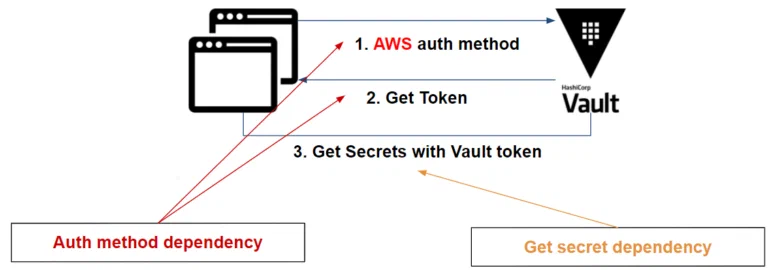
In previous posts, we have seen [how to integrate Vault into an application](https://github.com/mehdilaruelle/vault-demo). However, in each of the actions taken, we have seen that integration could impact the code and create dependencies with Vault.
There are **two dependencies**:
1. At the authentication and renewal of the Vault token:
1. First, the application must be "aware" of the authentication method (more information here: [How to choose your authentication method](https://mehdilaruelle.com/posts/2018/09/how-to-choose-your-authenticate-method-with-vault/)) in order to get its token.
2. Second, the token provided by the Vault has an expiration date and the application must be able to renew it if needed.
2. If the secret is dynamic, the application must be able to renew it.
To resume, based on an AWS application example, we have the following dependencies:
 [Vault Agent](https://developer.hashicorp.com/vault/docs/agent-and-proxy/agent) reduces your dependencies and tackles some dependencies like:
- [Auto-Auth](https://developer.hashicorp.com/vault/docs/agent-and-proxy/autoauth): Authenticate to the Vault and renew the token provided by Vault if it expires (if specified).
- [Template](https://developer.hashicorp.com/vault/docs/agent-and-proxy/agent/template): Retrieve secrets and renew dynamic secrets via the token generated by the Auto-Auth method. Previously [Consul-template](https://github.com/hashicorp/consul-template)
If we go back to the previous example, using the Vault Agent, we have:
[Vault Agent](https://developer.hashicorp.com/vault/docs/agent-and-proxy/agent) reduces your dependencies and tackles some dependencies like:
- [Auto-Auth](https://developer.hashicorp.com/vault/docs/agent-and-proxy/autoauth): Authenticate to the Vault and renew the token provided by Vault if it expires (if specified).
- [Template](https://developer.hashicorp.com/vault/docs/agent-and-proxy/agent/template): Retrieve secrets and renew dynamic secrets via the token generated by the Auto-Auth method. Previously [Consul-template](https://github.com/hashicorp/consul-template)
If we go back to the previous example, using the Vault Agent, we have:
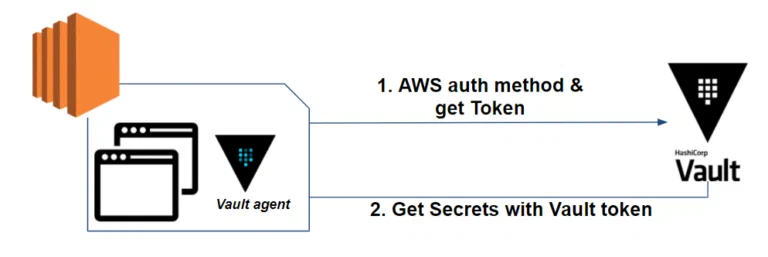 The Vault Agent initially allows us to authenticate to the Vault using the [AWS authentication method](https://developer.hashicorp.com/vault/docs/agent-and-proxy/autoauth/methods/aws) and renew the token if its lifetime expires.
In a second time, it allows us to retrieve secrets, render it into a [template file](https://developer.hashicorp.com/vault/docs/agent-and-proxy/agent/template) and finally to renew secrets if needed.
If you are on Kubernetes, it is possible to go through the [Vault Agent Sidecar Injector](https://www.vaultproject.io/docs/platform/k8s/injector), which will not be discussed here.
## Deploying our environment
In order to make the integration as transparent as possible for our application, our integration of the Vault Agent must be done in 2 parts:
1. Set up the authentication method and validate the Vault token retrieval. If necessary, renew the token.
2. Retrieve the secrets as well as the templating of our file containing our secrets. If necessary, verify that our secrets are renewed.
In our example, we will rely on:
- **Vault** in version 1.6.2
- **Terraform** in version 0.14.6
- A database which will be here **MySQL in version 5.7**
- A **PHP 7.2** and **Apache** web application
- With **static** ([secret engine K/V](https://www.vaultproject.io/docs/secrets/kv)) and **dynamic** ([secret engine Database](https://www.vaultproject.io/docs/secrets/databases)) **secrets**
- An [Approle](https://www.vaultproject.io/docs/auth/approle) authentication method will be used to authenticate the application to the Vault.
You will find the sources to reproduce this environment [here](https://github.com/mehdilaruelle/vault-demo/tree/master/step4b).
The environment is based on docker containers **so that you can reproduce the example on your side**.
Concerning the stack docker (docker-compose.yml, app.yml, etc), you can find details in the [previous posts](https://mehdilaruelle.com/posts/2019/03/migrate-your-application-secrets-in-vault-step-1/) or in the [readme project](https://github.com/mehdilaruelle/vault-demo/blob/master/README.md).
### Integrate the Vault Agent with the authentication method
Let’s start by installing Vault Agent.
To do this, simply download the Vault binary or packager with the application. All installation instructions can be found in the [official HashiCorp documentation](https://www.vaultproject.io/docs/install).
In our case, we add it in our [dockerfile](https://github.com/mehdilaruelle/vault-demo/blob/master/step4b/dockerfile#L8) to download the Vault Agent to build our image.
Once the installation is done, we can focus on the authentication which is Approle type with the Vault Agent.
In our case, for demonstration purpose, we will directly inject the role_id and secret_id in our container via the environment variables. In the case of a pipeline or a CI/CD, the implementation of the Approle method in a secure way is more technical and would deserve a whole post on the subject. You can find a HashiCorp Learn on the subject [AppRole With Terraform & Chef](https://learn.hashicorp.com/tutorials/vault/approle-trusted-entities?in=vault/auth-methods).
For our Vault Agent, to be able to authenticate in [Auto-Auth](https://developer.hashicorp.com/vault/docs/agent-and-proxy/autoauth) , we need to provide a configuration file including: the [authentication method](https://developer.hashicorp.com/vault/docs/agent-and-proxy/autoauth/methods) and the [Sinks](https://developer.hashicorp.com/vault/docs/agent-and-proxy/autoauth/sinks/file) (where should it write the Vault token?), currently having only a [file](https://developer.hashicorp.com/vault/docs/agent-and-proxy/autoauth/sinks/file) as a possibility.
In our case, we will have the [following configuration](https://github.com/mehdilaruelle/vault-demo/blob/master/step4b/vault/config.hcl) :
```hcl
pid_file = "./pidfile"
auto_auth {
method "approle" {
config = {
role_id_file_path = "/root/role-id"
secret_id_file_path = "/root/.secret-id"
remove_secret_id_file_after_reading = true
}
}
sink "file" {
config = {
path = "/var/www/.vault-token"
mode = 0644
}
}
}
template {
source = "/var/www/secrets.tpl"
destination = "/var/www/secrets.json"
}
```
On the **Approle method** side, we have to:
- Specify where the **role_id** and **secret_id** are located. In our case, these values are passed as environment variables, but the Vault Agent is only able to read these values via a file. So we will have to create these files at the entrypoint level with the expected values.
- The **remove_secret_id_file_after_reading** option removes the secret_id after the Vault Agent reads the file. A secure method to ensure that no one except the Vault Agent is able to authenticate again.
On the **sink** side, the configuration is rather simple:
- The **path** on which the Vault Agent will write the Vault token.
- The **mode** on which the Vault Agent will write the file rights. Here we put 644 so that the apache server is able to read the token. We can also set 600 to ensure that only the Vault Agent is able to read and modify the token.
Finally, the last elements of our configuration:
- **Vault address**: we pass the environment variable **VAULT_ADDR** containing the address of our Vault. The Vault Agent is able to refer to this address. In the opposite case, the Vault address must be entered [directly in the configuration file](https://developer.hashicorp.com/vault/docs/agent-and-proxy/agent#vault-stanza).
- **pid_file**: is the path on which the Vault Agent process ID is written. Knowing that the Vault Agent will run in background, it may be relevant to refer to this file in order to kill the process if necessary.
In order to complete our integration, we need to add an entrypoint to our container in order to:
- Provision the role_id and secret_id files through our environment variables
- Start the Vault Agent process in the background
- And finally launch our apache server
Our [entrypoint](https://github.com/mehdilaruelle/vault-demo/blob/master/step4b/vault/entrypoint.sh):
```bash
#! /bin/bash
echo "$VLT_ROLE_ID" >> /root/role-id
echo "$VLT_SECRET_ID" >> /root/.secret-id
vault agent -config=/root/config.hcl &
apache2-foreground
```
At this point, the Vault Agent is able to authenticate to the Vault and renew the Vault token.
### Integrate the Vault Agent to retrieve secret
As we have seen previously, the Vault Agent is based on a [template file](https://developer.hashicorp.com/vault/docs/agent-and-proxy/agent/template) in order to transform it into a file containing our secrets.
For our template, we will retrieve our **dynamic database secret**. We can do the same thing for other dynamic or static secrets.
We want the secrets to be stored in a JSON format, so we have the [following template](https://github.com/mehdilaruelle/vault-demo/blob/master/step4b/vault/secrets.tpl):
```jinja2
{
{{ with secret (env "VAULT_PATH") }}
"username":"{{ .Data.username }}",
"password":"{{ .Data.password }}"
{{ end }}
}
```
We use **VAULT_PATH**, an environment variable that contains as value **database/creds/web**, which is our path in order to retrieve our secret.
Vault Agent should, based on our template, create our secret file that should look like this:
```json
{
"username":"vault-1430158508-126",
"password":"132ae3ef-5a64-7499-351e-bfe59f3a2a21"
}
```
If you would like to learn more about the templating language used by the Vault Agent, you can refer to [Consul Template’s documentation](https://github.com/hashicorp/consul-template/blob/master/docs/templating-language.md).
All we have to do is to indicate to our Vault Agent, in its [configuration file](https://github.com/mehdilaruelle/vault-demo/blob/master/step4b/vault/config.hcl), the template source file and the secrets destination file:
```hcl
template {
source = "/var/www/secrets.tpl"
destination = "/var/www/secrets.json"
}
```
The secrets template file as well as the Vault Agent configuration file must be copied into the [dockerfile](https://github.com/mehdilaruelle/vault-demo/blob/master/step4b/dockerfile).
Finally, we just have [to tell our application](https://github.com/mehdilaruelle/vault-demo/blob/master/step4b/web/index.php) to read the secret file and store the secrets in variables if it is not already the case:
```php
if (file_exists("/var/www/secrets.json")) {
$secrets_json = file_get_contents("/var/www/secrets.json", "r");
$user = json_decode($secrets_json)->{'username'};
$pass = json_decode($secrets_json)->{'password'};
}
else{
echo "Secrets not found.";
exit;
}
```
### Testing our example
Once the Vault Agent is able to authenticate itself and recover its secrets, all we have to do is test our application. The project [README](https://github.com/mehdilaruelle/vault-demo/blob/master/step4b/README.md) explains in detail each step of the test and a [Makefile](https://github.com/mehdilaruelle/vault-demo/blob/master/step4b/Makefile) is at your disposal.
Let’s start with our infrastructure:
```bash
$ docker run --rm -v $(pwd)/terraform:/app/ -w /app/ hashicorp/terraform:light init
$ docker-compose up
```
The infrastructure is operational, we can access our Vault with this address: [http://127.0.0.1:8200](http://127.0.0.1:8200)
On the application side:
```bash
$ docker-compose -f app.yml build
$ role_id=$(docker run --rm -v $(pwd)/terraform:/app/ -w /app/ hashicorp/terraform:light output -raw approle_role_id)
$ secret_id=$(docker run --rm -v $(pwd)/terraform:/app/ -w /app/ hashicorp/terraform:light output -raw approle_secret_id)
$ docker-compose -f app.yml run -e VLT_ROLE_ID=$role_id -e VLT_SECRET_ID=$secret_id --service-ports web
```
The application is now available at the following address: [http://127.0.0.1:8080](http://127.0.0.1:8080)
The following page should appear:
The Vault Agent initially allows us to authenticate to the Vault using the [AWS authentication method](https://developer.hashicorp.com/vault/docs/agent-and-proxy/autoauth/methods/aws) and renew the token if its lifetime expires.
In a second time, it allows us to retrieve secrets, render it into a [template file](https://developer.hashicorp.com/vault/docs/agent-and-proxy/agent/template) and finally to renew secrets if needed.
If you are on Kubernetes, it is possible to go through the [Vault Agent Sidecar Injector](https://www.vaultproject.io/docs/platform/k8s/injector), which will not be discussed here.
## Deploying our environment
In order to make the integration as transparent as possible for our application, our integration of the Vault Agent must be done in 2 parts:
1. Set up the authentication method and validate the Vault token retrieval. If necessary, renew the token.
2. Retrieve the secrets as well as the templating of our file containing our secrets. If necessary, verify that our secrets are renewed.
In our example, we will rely on:
- **Vault** in version 1.6.2
- **Terraform** in version 0.14.6
- A database which will be here **MySQL in version 5.7**
- A **PHP 7.2** and **Apache** web application
- With **static** ([secret engine K/V](https://www.vaultproject.io/docs/secrets/kv)) and **dynamic** ([secret engine Database](https://www.vaultproject.io/docs/secrets/databases)) **secrets**
- An [Approle](https://www.vaultproject.io/docs/auth/approle) authentication method will be used to authenticate the application to the Vault.
You will find the sources to reproduce this environment [here](https://github.com/mehdilaruelle/vault-demo/tree/master/step4b).
The environment is based on docker containers **so that you can reproduce the example on your side**.
Concerning the stack docker (docker-compose.yml, app.yml, etc), you can find details in the [previous posts](https://mehdilaruelle.com/posts/2019/03/migrate-your-application-secrets-in-vault-step-1/) or in the [readme project](https://github.com/mehdilaruelle/vault-demo/blob/master/README.md).
### Integrate the Vault Agent with the authentication method
Let’s start by installing Vault Agent.
To do this, simply download the Vault binary or packager with the application. All installation instructions can be found in the [official HashiCorp documentation](https://www.vaultproject.io/docs/install).
In our case, we add it in our [dockerfile](https://github.com/mehdilaruelle/vault-demo/blob/master/step4b/dockerfile#L8) to download the Vault Agent to build our image.
Once the installation is done, we can focus on the authentication which is Approle type with the Vault Agent.
In our case, for demonstration purpose, we will directly inject the role_id and secret_id in our container via the environment variables. In the case of a pipeline or a CI/CD, the implementation of the Approle method in a secure way is more technical and would deserve a whole post on the subject. You can find a HashiCorp Learn on the subject [AppRole With Terraform & Chef](https://learn.hashicorp.com/tutorials/vault/approle-trusted-entities?in=vault/auth-methods).
For our Vault Agent, to be able to authenticate in [Auto-Auth](https://developer.hashicorp.com/vault/docs/agent-and-proxy/autoauth) , we need to provide a configuration file including: the [authentication method](https://developer.hashicorp.com/vault/docs/agent-and-proxy/autoauth/methods) and the [Sinks](https://developer.hashicorp.com/vault/docs/agent-and-proxy/autoauth/sinks/file) (where should it write the Vault token?), currently having only a [file](https://developer.hashicorp.com/vault/docs/agent-and-proxy/autoauth/sinks/file) as a possibility.
In our case, we will have the [following configuration](https://github.com/mehdilaruelle/vault-demo/blob/master/step4b/vault/config.hcl) :
```hcl
pid_file = "./pidfile"
auto_auth {
method "approle" {
config = {
role_id_file_path = "/root/role-id"
secret_id_file_path = "/root/.secret-id"
remove_secret_id_file_after_reading = true
}
}
sink "file" {
config = {
path = "/var/www/.vault-token"
mode = 0644
}
}
}
template {
source = "/var/www/secrets.tpl"
destination = "/var/www/secrets.json"
}
```
On the **Approle method** side, we have to:
- Specify where the **role_id** and **secret_id** are located. In our case, these values are passed as environment variables, but the Vault Agent is only able to read these values via a file. So we will have to create these files at the entrypoint level with the expected values.
- The **remove_secret_id_file_after_reading** option removes the secret_id after the Vault Agent reads the file. A secure method to ensure that no one except the Vault Agent is able to authenticate again.
On the **sink** side, the configuration is rather simple:
- The **path** on which the Vault Agent will write the Vault token.
- The **mode** on which the Vault Agent will write the file rights. Here we put 644 so that the apache server is able to read the token. We can also set 600 to ensure that only the Vault Agent is able to read and modify the token.
Finally, the last elements of our configuration:
- **Vault address**: we pass the environment variable **VAULT_ADDR** containing the address of our Vault. The Vault Agent is able to refer to this address. In the opposite case, the Vault address must be entered [directly in the configuration file](https://developer.hashicorp.com/vault/docs/agent-and-proxy/agent#vault-stanza).
- **pid_file**: is the path on which the Vault Agent process ID is written. Knowing that the Vault Agent will run in background, it may be relevant to refer to this file in order to kill the process if necessary.
In order to complete our integration, we need to add an entrypoint to our container in order to:
- Provision the role_id and secret_id files through our environment variables
- Start the Vault Agent process in the background
- And finally launch our apache server
Our [entrypoint](https://github.com/mehdilaruelle/vault-demo/blob/master/step4b/vault/entrypoint.sh):
```bash
#! /bin/bash
echo "$VLT_ROLE_ID" >> /root/role-id
echo "$VLT_SECRET_ID" >> /root/.secret-id
vault agent -config=/root/config.hcl &
apache2-foreground
```
At this point, the Vault Agent is able to authenticate to the Vault and renew the Vault token.
### Integrate the Vault Agent to retrieve secret
As we have seen previously, the Vault Agent is based on a [template file](https://developer.hashicorp.com/vault/docs/agent-and-proxy/agent/template) in order to transform it into a file containing our secrets.
For our template, we will retrieve our **dynamic database secret**. We can do the same thing for other dynamic or static secrets.
We want the secrets to be stored in a JSON format, so we have the [following template](https://github.com/mehdilaruelle/vault-demo/blob/master/step4b/vault/secrets.tpl):
```jinja2
{
{{ with secret (env "VAULT_PATH") }}
"username":"{{ .Data.username }}",
"password":"{{ .Data.password }}"
{{ end }}
}
```
We use **VAULT_PATH**, an environment variable that contains as value **database/creds/web**, which is our path in order to retrieve our secret.
Vault Agent should, based on our template, create our secret file that should look like this:
```json
{
"username":"vault-1430158508-126",
"password":"132ae3ef-5a64-7499-351e-bfe59f3a2a21"
}
```
If you would like to learn more about the templating language used by the Vault Agent, you can refer to [Consul Template’s documentation](https://github.com/hashicorp/consul-template/blob/master/docs/templating-language.md).
All we have to do is to indicate to our Vault Agent, in its [configuration file](https://github.com/mehdilaruelle/vault-demo/blob/master/step4b/vault/config.hcl), the template source file and the secrets destination file:
```hcl
template {
source = "/var/www/secrets.tpl"
destination = "/var/www/secrets.json"
}
```
The secrets template file as well as the Vault Agent configuration file must be copied into the [dockerfile](https://github.com/mehdilaruelle/vault-demo/blob/master/step4b/dockerfile).
Finally, we just have [to tell our application](https://github.com/mehdilaruelle/vault-demo/blob/master/step4b/web/index.php) to read the secret file and store the secrets in variables if it is not already the case:
```php
if (file_exists("/var/www/secrets.json")) {
$secrets_json = file_get_contents("/var/www/secrets.json", "r");
$user = json_decode($secrets_json)->{'username'};
$pass = json_decode($secrets_json)->{'password'};
}
else{
echo "Secrets not found.";
exit;
}
```
### Testing our example
Once the Vault Agent is able to authenticate itself and recover its secrets, all we have to do is test our application. The project [README](https://github.com/mehdilaruelle/vault-demo/blob/master/step4b/README.md) explains in detail each step of the test and a [Makefile](https://github.com/mehdilaruelle/vault-demo/blob/master/step4b/Makefile) is at your disposal.
Let’s start with our infrastructure:
```bash
$ docker run --rm -v $(pwd)/terraform:/app/ -w /app/ hashicorp/terraform:light init
$ docker-compose up
```
The infrastructure is operational, we can access our Vault with this address: [http://127.0.0.1:8200](http://127.0.0.1:8200)
On the application side:
```bash
$ docker-compose -f app.yml build
$ role_id=$(docker run --rm -v $(pwd)/terraform:/app/ -w /app/ hashicorp/terraform:light output -raw approle_role_id)
$ secret_id=$(docker run --rm -v $(pwd)/terraform:/app/ -w /app/ hashicorp/terraform:light output -raw approle_secret_id)
$ docker-compose -f app.yml run -e VLT_ROLE_ID=$role_id -e VLT_SECRET_ID=$secret_id --service-ports web
```
The application is now available at the following address: [http://127.0.0.1:8080](http://127.0.0.1:8080)
The following page should appear:
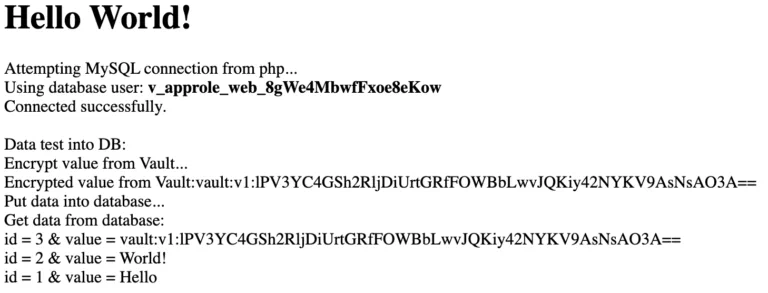
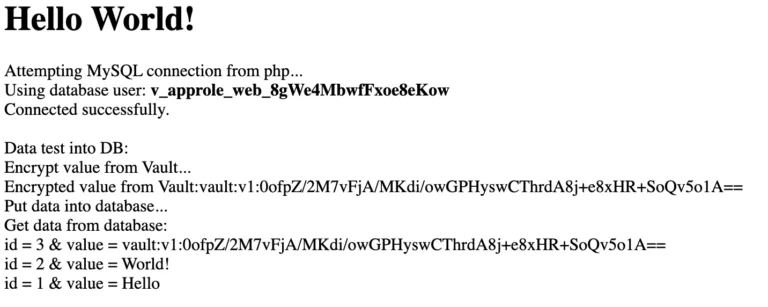 If we refresh the page, only the value encrypted via the Vault’s EaaS (Encryption as a Service) changes and our application re-uses our database secret:
 To test the proper functioning of the secret rotation and the Vault token, we can revoke the leases:
 On the token Vault side: **auth/approle/login**
 On the Vault secrets side: **database/creds/web**
Logs on the Vault Agent side:
On the Vault secrets side: **database/creds/web**
Logs on the Vault Agent side:
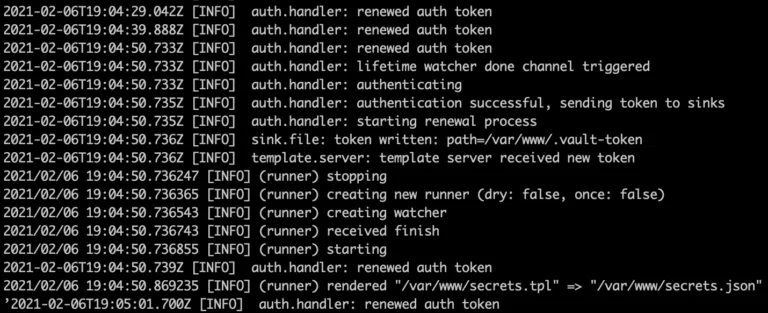 As we an see:
- **If the Vault token expires**: the Vault Agent re-authenticates
- **If the secrets expire**the Vault Agent retrieves new secrets and updates our secret file.
Finally, for cleaning purposes, don’t forget to execute the following commands:
```bash
$ docker-compose down
$ docker-compose -f app.yml down
$ rm terraform/terraform.tfstate
```
## What you need to remember
- If your application consumes its secrets through a file, then using the Vault Agent allows you to integrate the Vault seamlessly. Otherwise, if it uses environment variables, there is a possibility of integration with [envconsul](https://github.com/hashicorp/envconsul). For those who wish to test this method, you can consult the [GitHub repository which is based on our example](https://github.com/mehdilaruelle/vault-demo/tree/master/step4).
- Vault Agent takes care of the rotation of your secrets (if they are dynamic) and the Vault token.
- Vault Agent uses a template file to create the file containing our secrets. You can learn more about the [Consul Template documentation](https://github.com/hashicorp/consul-template/blob/master/docs/templating-language.md).
- We no longer modify our application code to integrate the Vault, with the exception of EaaS (Encryption as a Service). The application is able to retrieve a Vault token that is renewed by the Vault Agent for EaaS.
- In our example, we use [a dynamic role for the secret engine Database](https://www.vaultproject.io/docs/secrets/databases#database-capabilities). It is also possible to use [static roles](https://www.vaultproject.io/docs/secrets/databases#static-roles) if you want to avoid generating a large number of database users on the fly.
- We have modified the entrypoint of our application to launch the Vault Agent but it is possible to launch it at the startup of our container via systemd or other system/service manager in order to avoid altering the entrypoint.
As we have seen in this post, **we have removed the dependencies between our application code and HashiCorp Vault** with Vault Agent. This also brings an automatic rotation of the Vault token and secrets made by the Vault Agent.
The integration of the Vault within our application becomes transparent and the same goes for the management of secrets by the different teams (dev, ops, etc).
However, in order to make the integration of the Vault transparent from end to end, there remains one question that we have not addressed in this post: **How to make the integration of the Vault transparent for the deployment of an application via a pipeline?**
This will certainly be the subject of another post!
---
Originally published at https://mehdilaruelle.com/posts/2021/02/how-to-reduce-code-dependency-with-vault-agent/
As we an see:
- **If the Vault token expires**: the Vault Agent re-authenticates
- **If the secrets expire**the Vault Agent retrieves new secrets and updates our secret file.
Finally, for cleaning purposes, don’t forget to execute the following commands:
```bash
$ docker-compose down
$ docker-compose -f app.yml down
$ rm terraform/terraform.tfstate
```
## What you need to remember
- If your application consumes its secrets through a file, then using the Vault Agent allows you to integrate the Vault seamlessly. Otherwise, if it uses environment variables, there is a possibility of integration with [envconsul](https://github.com/hashicorp/envconsul). For those who wish to test this method, you can consult the [GitHub repository which is based on our example](https://github.com/mehdilaruelle/vault-demo/tree/master/step4).
- Vault Agent takes care of the rotation of your secrets (if they are dynamic) and the Vault token.
- Vault Agent uses a template file to create the file containing our secrets. You can learn more about the [Consul Template documentation](https://github.com/hashicorp/consul-template/blob/master/docs/templating-language.md).
- We no longer modify our application code to integrate the Vault, with the exception of EaaS (Encryption as a Service). The application is able to retrieve a Vault token that is renewed by the Vault Agent for EaaS.
- In our example, we use [a dynamic role for the secret engine Database](https://www.vaultproject.io/docs/secrets/databases#database-capabilities). It is also possible to use [static roles](https://www.vaultproject.io/docs/secrets/databases#static-roles) if you want to avoid generating a large number of database users on the fly.
- We have modified the entrypoint of our application to launch the Vault Agent but it is possible to launch it at the startup of our container via systemd or other system/service manager in order to avoid altering the entrypoint.
As we have seen in this post, **we have removed the dependencies between our application code and HashiCorp Vault** with Vault Agent. This also brings an automatic rotation of the Vault token and secrets made by the Vault Agent.
The integration of the Vault within our application becomes transparent and the same goes for the management of secrets by the different teams (dev, ops, etc).
However, in order to make the integration of the Vault transparent from end to end, there remains one question that we have not addressed in this post: **How to make the integration of the Vault transparent for the deployment of an application via a pipeline?**
This will certainly be the subject of another post!
---
Originally published at https://mehdilaruelle.com/posts/2021/02/how-to-reduce-code-dependency-with-vault-agent/